
B.4 Dashboard
The parent dashboard is the landing page (displayed upon successfully logginglogged in) that presents several key widgets, including but not limited to:
- Child's
statisticstatistics widget: shows the child's name along with:- Number of assignments (Heute: x, Bald: x, Langfristig: x)
- Number of project board(s)
- Check-in stats: a breakdown of the child's emotional check-ins — such as happy, optimistic, stressed, angry, down, or sad — with filter options (This Week, This Month, This Year)
- Rewards: The total number of achievements collected (stars, shooting stars, and galaxies).
- Feedback / Support updates widget: if there are reply regarding submitted feedback to the Homework-Buddy staff.
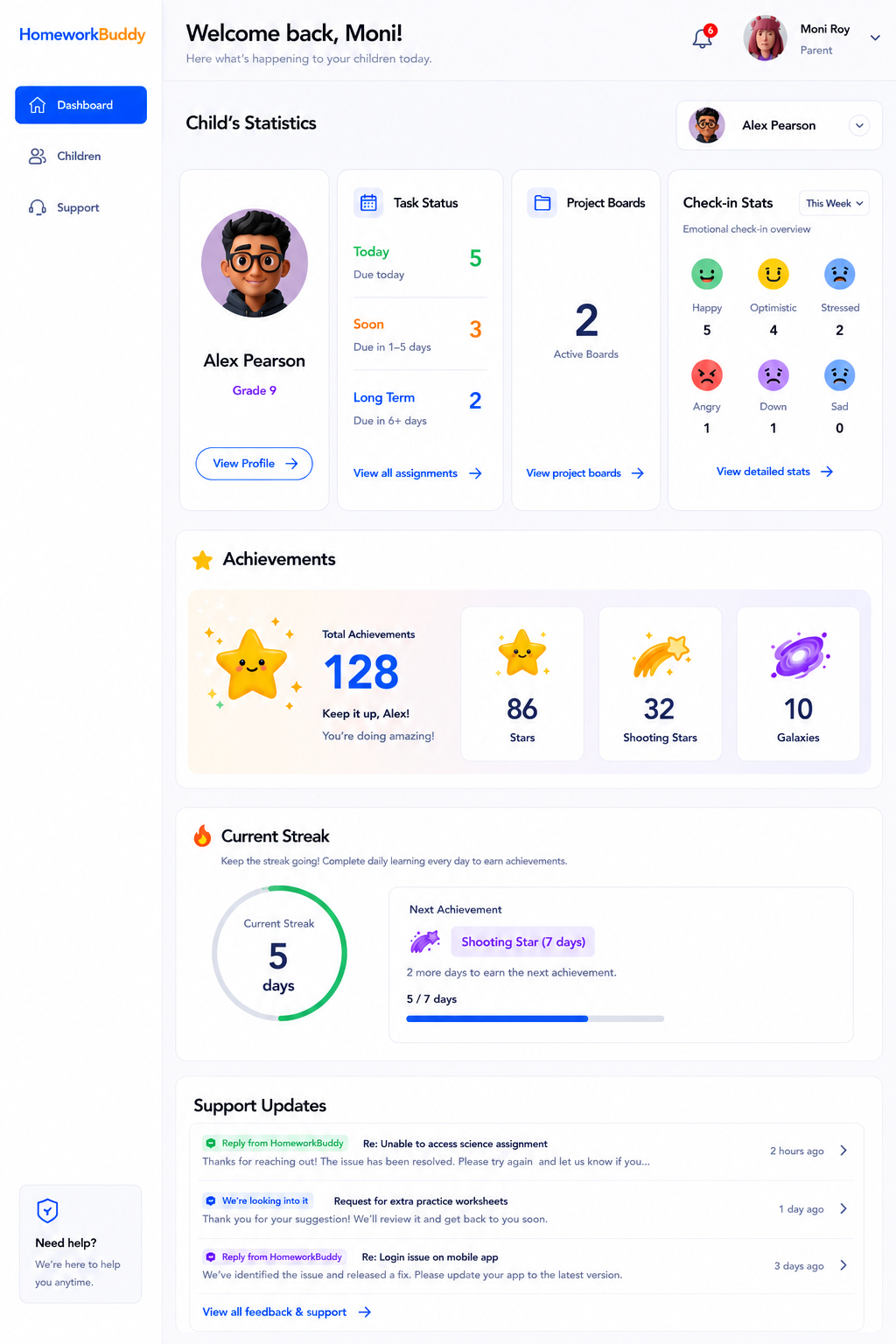
Image B.4.1 Dashboard
Sidenav or Main Menus
Usually placed in the left-most side of the app, the sidenav for parents offer 3 menus:
- Dashboard: this page here
- Children: please refer to this page
- Feedback / Support: please refer to this page
Header Menus
- Notifications: please refer to this page
- My Account: please refer to this page
- Logout: please refer to this page
Image B.4.1 Dashboard