
B.10 Timetable & Study Times
Here parents can specify their child(ren)'s timetable and study times.
This sectionpage ishelps availableparents becauseorganize timetable management is enabled for the child. Parents can create and manage thetheir child’s classweekly schedule,learning subjects,schedule by combining school subjects and schoolstudy times.sessions Sinceinto an easy-to-manage timetable.
Users can drag and drop subjects or study sessions into available time slots throughout the Schoolbag-Packingweek, Helperincluding weekends. When a subject or study session is disabled,added, packinga materialspop-up dialog appears so the parent or child can set the desired study commitment duration — such as 30, 45, or 60 minutes — or enter a custom duration in minutes.
Additional features include:
- Drag-and-drop scheduling for quick planning
- Customizable study durations for each session
- Weekly timetable view from Monday to Sunday
- Subject and
checklistsessionfeaturesmanagementarepanel - Search
included.and quick-add functionality for subjects - Optional schoolbag-packing helper integration
- Save and clear actions for easy schedule management
This interface is designed to make study planning simple, flexible, and child-friendly while encouraging better time management and learning habits.
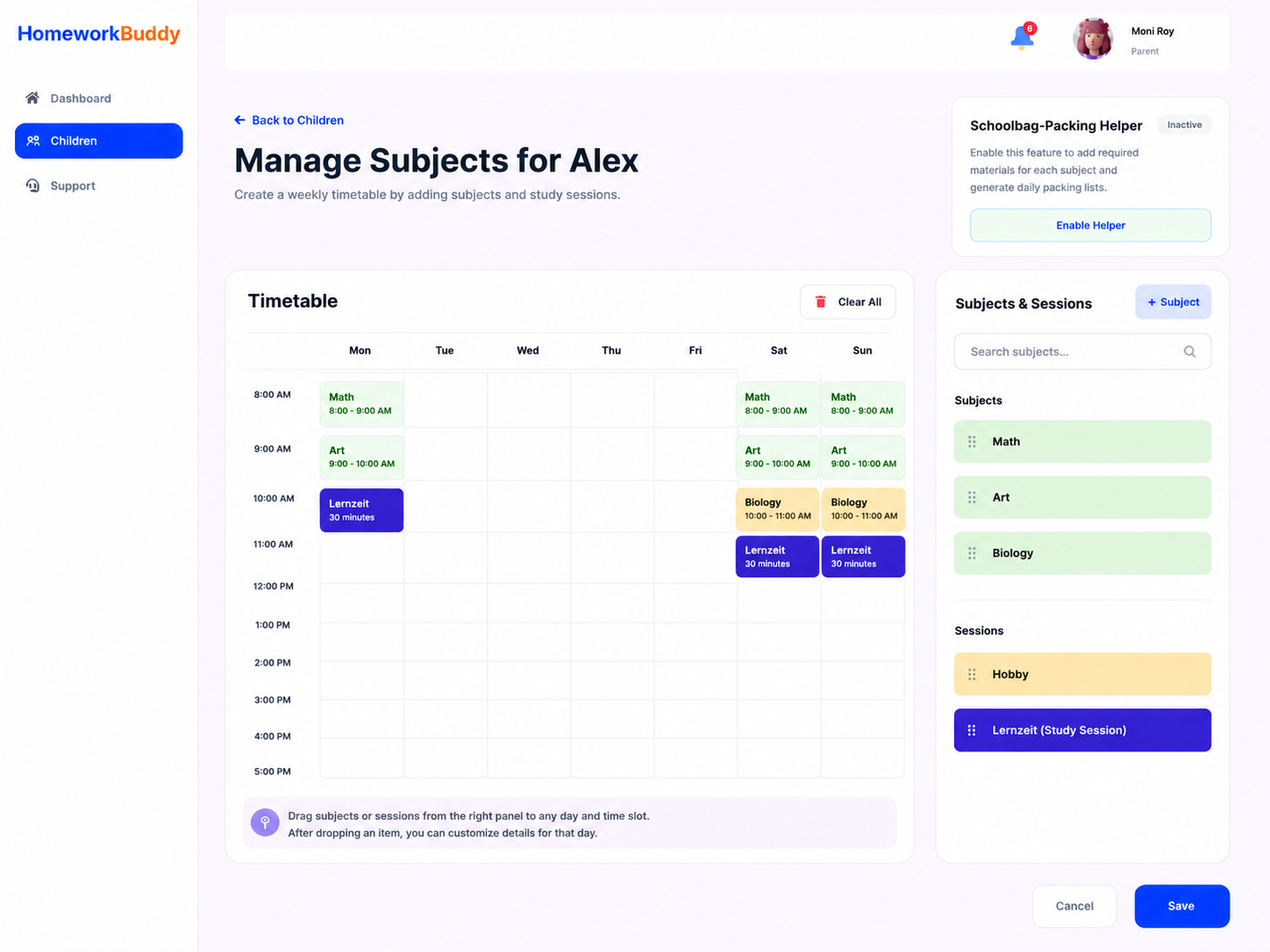
Image B.10.1 CreateManage TimetableChild's Subjects

Image B.10.2 Pop-up to add time for study
This section is only available when the Schoolbag-Packing Helper feature is enabled. ParentsIt areis requireddesigned to help parents organize their child’s weekly study schedule simply and interactively. At the center of the page, there is a weekly timetable displaying schedules from Monday to Sunday based on study hours. Parents can easily add subjects or study sessions into specific time slots using a drag-and-drop system, making schedule management faster and more intuitive.
On the right side, the Subjects & Sessions panel contains a list of subjects and requiredlearning materialsactivities such as Math, Art, Biology, and additional study sessions. These items can be dragged directly into the timetable to create a personalized learning schedule.
A pop-up configuration feature allows users to manage school bag items for each classsubject soon HomeworkBuddya canspecific automaticallyday, generateincluding textbooks, notebooks, calculators, or lab equipment. This helps parents ensure that children are properly prepared for school every day.
Additional features include:
- Drag-and-drop scheduling for quick planning
- Weekly timetable view from Monday to Sunday
- Subject and session management panel
- Manage school bag items for each subject on a specific day
- Search and quick-add functionality for subjects
- Save and clear actions for easy schedule management
Overall, this page is designed to provide parents with an organized and user-friendly way to manage their child’s academic activities, weekly study plans, and daily schoolbagschool packing checklists for the child.preparation.
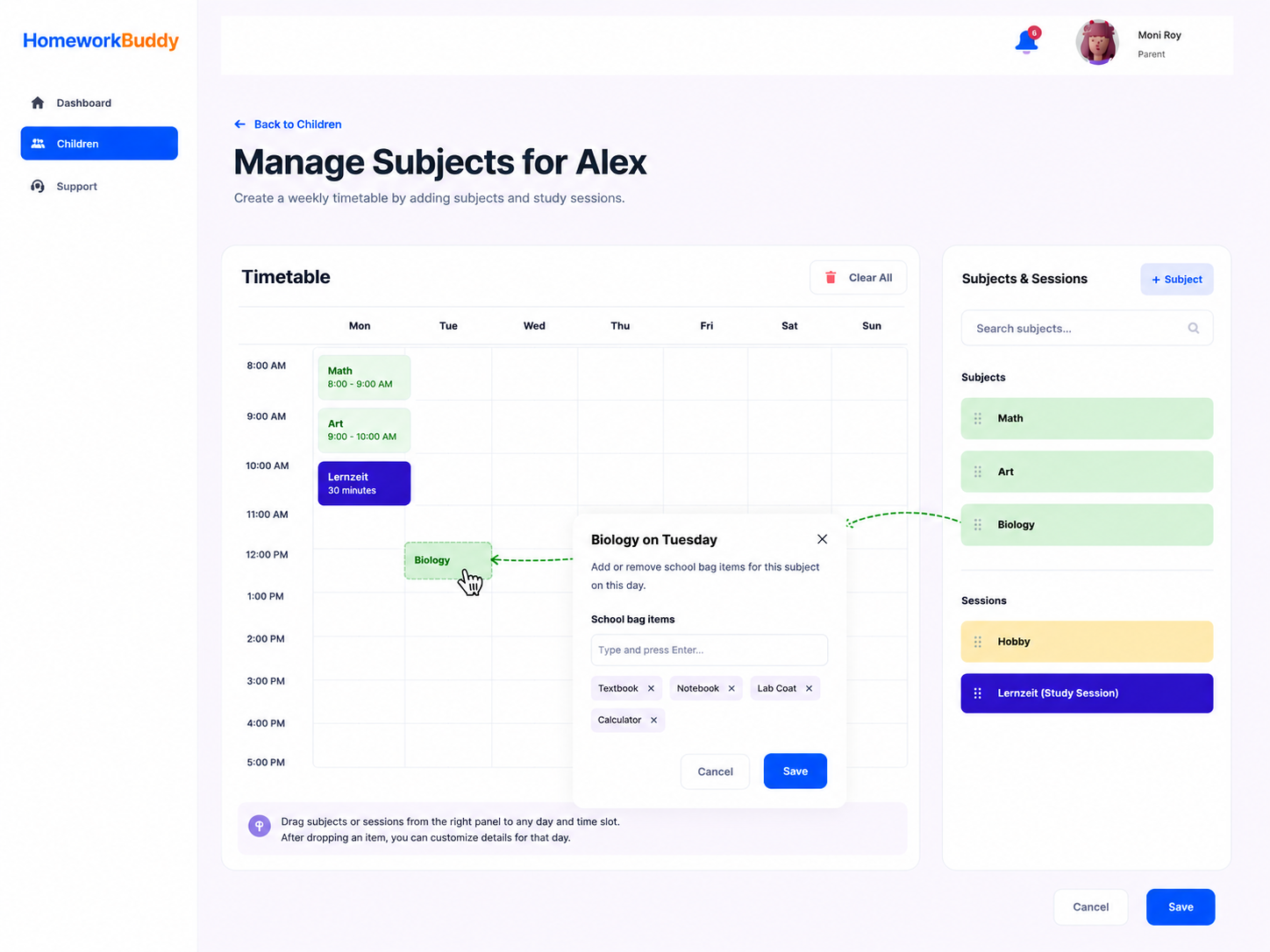
Image B. 10.23 CreateManage Child's Subjects &for RequiredSchooldbag-Paking MaterialsHelper