
B.10 Timetable & Study Times
Here parents can specify their child(ren)'s timetable and study times.
This page helps parents organize their child’s weekly learning schedule by combining school subjects and study sessions into an easy-to-manage timetable.
Users can drag and drop subjects or study sessions into available time slots throughout the week, including weekends.
First, students should commit to a fixed minimum daily study time. Recommendations: grade 3-4: 45 min, grade 5-6: 60 min, grade 7-8: 75 min, grade 9+: 90 min
--> They select one study time that is then used for all the study time slots. If they want to shorten it on a specific day, they get a note that they should add that time another day. So by default the study time should have the length that they chose in the beginning.
There should be a study time on each school day, if there is none, they should get a note that this is recommended because there could be homework from one day to the next.
When a subject or study session is added, a pop-up dialog appears so the parent or child can set the desired study commitment duration — such as 30, 45, 60, 75 and 90 minutes — or enter a custom duration in minutes.
If a study time is split, a star is rewarded once both times are done.
Additional features include:
- Drag-and-drop scheduling for quick planning
- Customizable study durations for each session, by default length is set according to what they chose earlier
- Weekly timetable view from Monday to Sunday
- Subject and session management panel
- Search and quick-add functionality for subjects
- Optional schoolbag-packing helper integration
- Save and clear actions for easy schedule management
This interface is designed to make study planning simple, flexible, and child-friendly while encouraging better time management and learning habits.
Timetable Management Overview
This page allows parents to create and manage a child’s weekly study timetable using a drag-and-drop calendar system similar to Google Calendar. Subjects and study sessions can be organized visually across different days and time slots.
Parents can organize:
- school subjects
- study sessions
- learning schedules
- packing-related activities
using an interactive weekly calendar.
Added some features based on our discussion and request above, other than that actually still the same as the previous system:
Settings Cards
1. Fix Minimum Daily Study Time
Allows parents to define the minimum required daily study duration.
Features;
- Dropdown selection for study duration
- Helps maintain consistent study habits
- Example values:
- 30 min
- 1 hour
- 2 hours
2. Allow Child to Modify Timetable
Enables children to edit or adjust their own timetable.
- Toggle ON/OFF control
- Allows schedule flexibility
- Supports approved timetable changes
3. Schoolbag-Packing Helper
Automatically generates packing suggestions based on scheduled subjects.
- Detects subjects placed in timetable
- Suggests required school items
- Helps children prepare school bags
Timetable Calendar
The timetable system behaves similarly to Google Calendar with a weekly calendar layout.
Weekly View
Displays:
- days of the week
- hourly time slots
- scheduled subjects/sessions
- Previous week
- Next week
- Today shortcut
View Selector
Allows switching calendar view:
- Week view
- Future expandable views (optional)
Sync to WebUntis
Allows timetable synchronization with WebUntis
Features
- Import school schedules automatically
- Reduce manual timetable setup
- Keep schedules updated
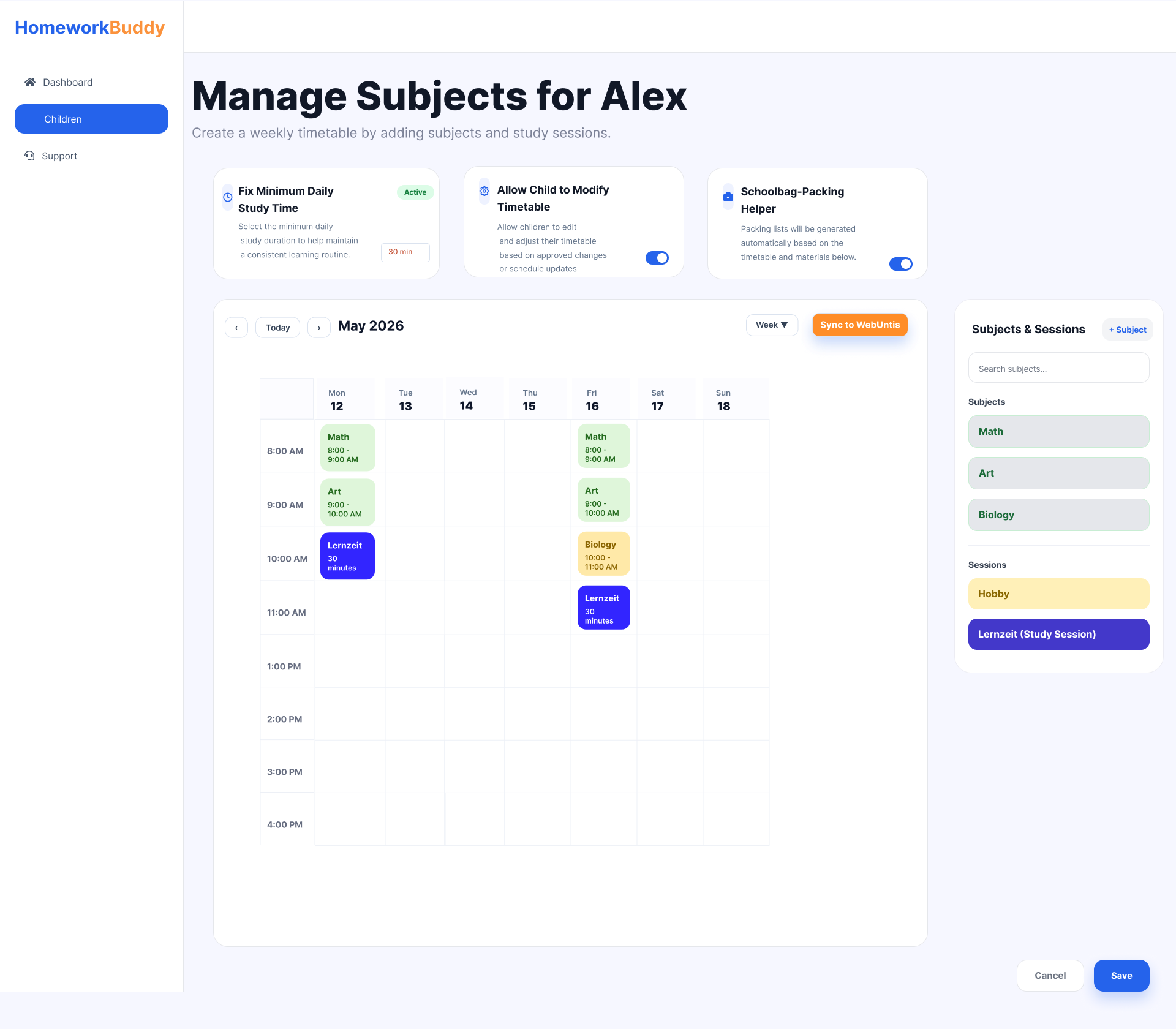
Image B.10.1 Manage Child's Subjects

Image B.10.2 Pop-up to add time for study
This section is only available when the Schoolbag-Packing Helper feature is enabled. It is designed to help parents organize their child’s weekly study schedule simply and interactively. At the center of the page, there is a weekly timetable displaying schedules from Monday to Sunday based on study hours. Parents can easily add subjects or study sessions into specific time slots using a drag-and-drop system, making schedule management faster and more intuitive.
On the right side, the Subjects & Sessions panel contains a list of subjects and learning activities such as Math, Art, Biology, and additional study sessions. These items can be dragged directly into the timetable to create a personalized learning schedule.
A pop-up configuration feature allows users to manage school bag items for each subject on a specific day, including textbooks, notebooks, calculators, or lab equipment. This helps parents ensure that children are properly prepared for school every day.
Additional features include:
- Drag-and-drop scheduling for quick planning
- Weekly timetable view from Monday to Sunday
- Subject and session management panel
- Manage school bag items for each subject on a specific day
- Search and quick-add functionality for subjects
- Save and clear actions for easy schedule management
Overall, this page is designed to provide parents with an organized and user-friendly way to manage their child’s academic activities, weekly study plans, and daily school preparation.
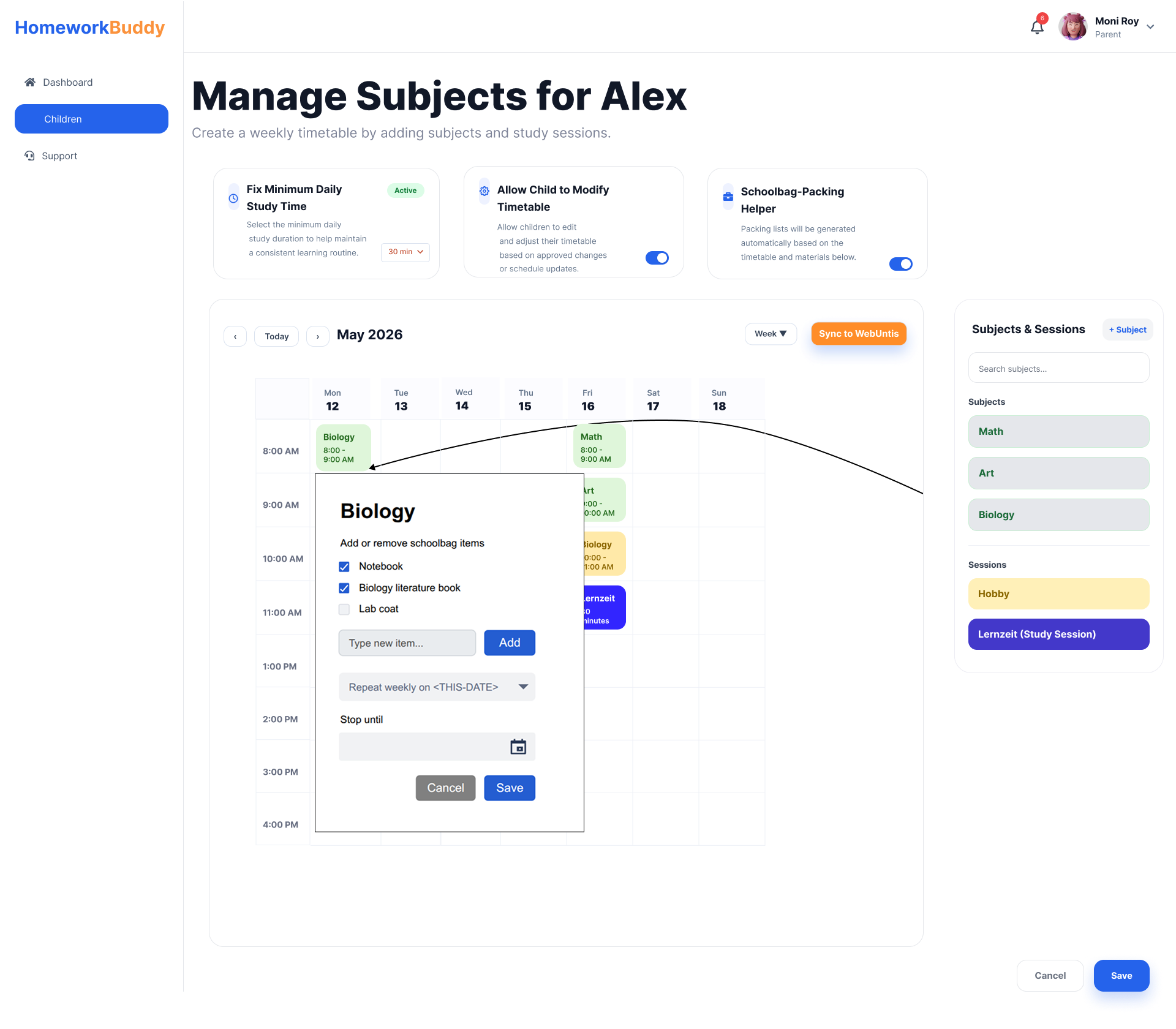
Image B.10.3 Pop-up Default Weekly Subject Repetition
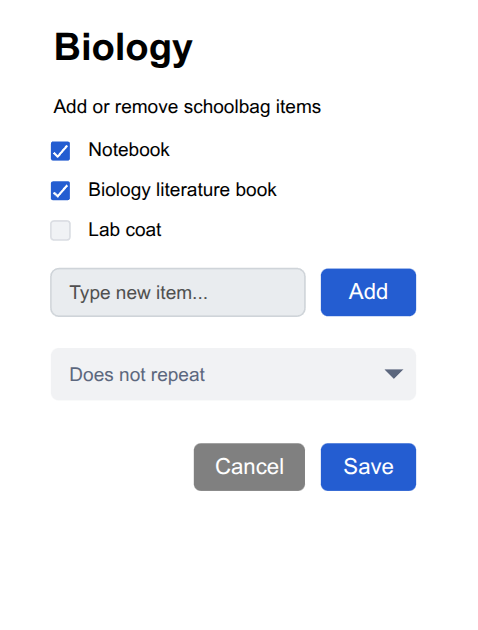
Image B.10.4 Pop-up with no repetition
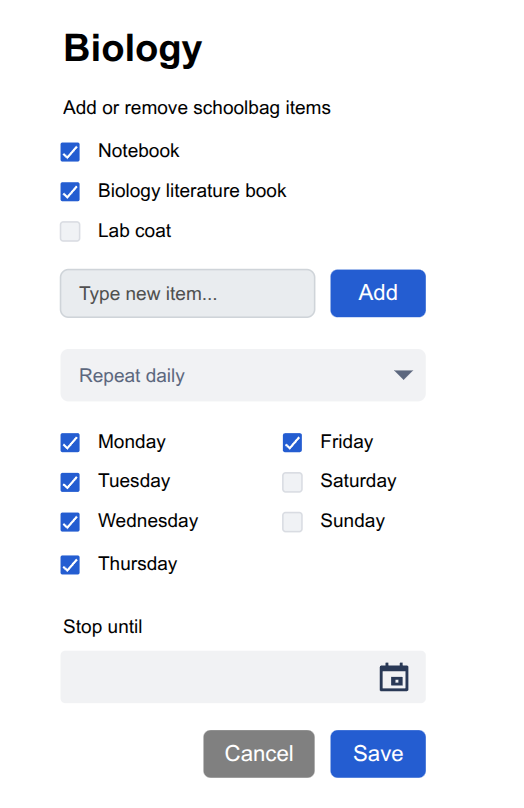
Image B.10.5 Pop-up Repeat Based on Selected Days
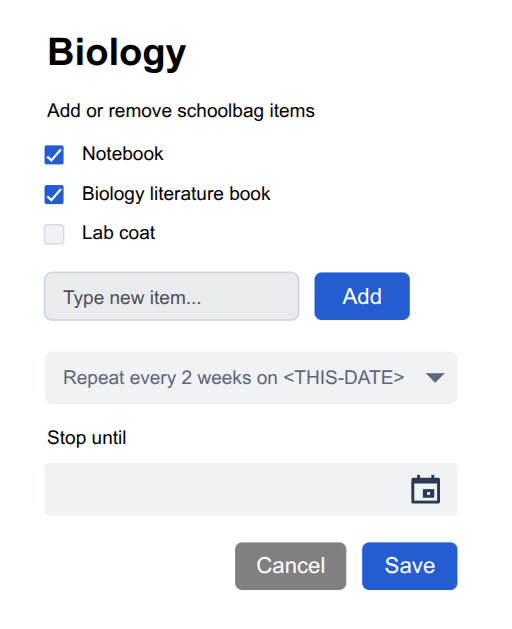
Image B. 10.6 Pop-up Repeat Frequency Settings
No comments to display
No comments to display